What is a SOCKS5 proxy and how does it work? This in-depth guide explains setup, security considerations, real-world use cases, and how SOCKS5 compares to VPNs.
SOCKS5 Proxy Explained: How It Works, How to Set It Up, and Why It Still Matters in a Zero-Trust World
Introduction: The Invisible Middleman of the Internet
Most people think the internet is a straight line.
You click a link. The server responds. End of story.
In reality, it’s more like a crowded airport with dozens of security checks, detours, and hidden corridors. Somewhere in that maze sits an unassuming but powerful tool: the SOCKS5 proxy.
Unlike flashy VPN ads or buzzword-heavy privacy tools, SOCKS5 works quietly. It doesn’t encrypt your traffic by default. It doesn’t shout about anonymity. And yet, for developers, traders, researchers, gamers, and security professionals, it remains one of the most flexible traffic-routing technologies ever created.
This article breaks SOCKS5 down to its core.
How it works.
How to install and configure it on real platforms.
Where it shines, where it fails, and how to use it safely in a global context.
No fluff. No fearmongering. Just clarity.
What Is a SOCKS5 Proxy, Really?
At its simplest, a SOCKS5 proxy is a traffic relay.
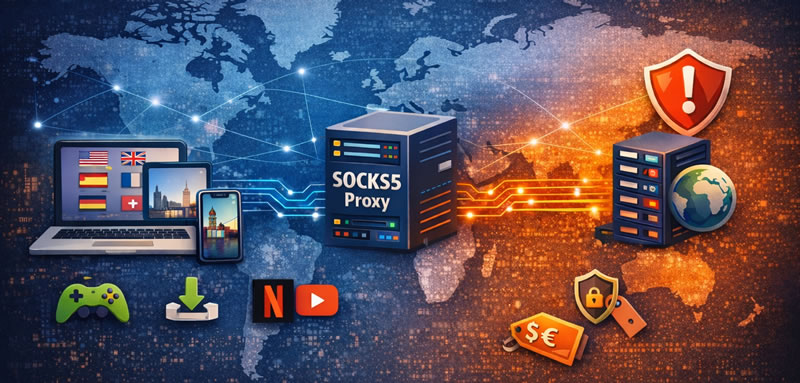
Instead of your device talking directly to a destination server, it sends requests to an intermediary server (the proxy), which then forwards those requests on your behalf. The response takes the same path back.
What makes SOCKS5 different from older proxy types is protocol neutrality.
It doesn’t care whether the traffic is:
- HTTP or HTTPS
- FTP
- SMTP
- Torrent traffic
- Game packets
- API calls
- Custom TCP or UDP streams
If it can be transported over TCP or UDP, SOCKS5 can move it.
That single design choice is why SOCKS5 remains relevant decades after its creation.
How SOCKS5 Works Under the Hood
Let’s follow a request step by step.
- Your application (browser, app, script) initiates a connection.
- Instead of reaching the destination directly, it connects to the SOCKS5 server.
- Authentication is negotiated (username/password, IP-based, or none).
- The proxy establishes a connection to the target server.
- Data flows back and forth transparently.
Crucially, SOCKS5 does not modify packets.
It does not rewrite headers.
It does not interpret application data.
It simply moves bytes from point A to point B.
Think of it as a smart courier, not a translator.
SOCKS5 vs HTTP Proxy vs VPN
Here’s where confusion usually begins.
| Feature | SOCKS5 Proxy | HTTP Proxy | VPN |
|---|---|---|---|
| Protocol support | All TCP/UDP | HTTP/HTTPS only | All traffic |
| Encryption | No (by default) | No | Yes |
| App-level control | Yes | Limited | No |
| Speed | Very high | Medium | Lower |
| System-wide | No | No | Yes |
| IP masking | Yes | Yes | Yes |
A SOCKS5 proxy is not a VPN replacement.
It’s a precision tool, not a blanket solution.
Professionals use SOCKS5 when they need:
- Fine-grained traffic control
- High speed with minimal overhead
- Application-specific routing
Global Use Cases (Real-World Examples)
1. Market Research and SERP Analysis
For companies operating across borders, search results are never universal.
What appears on the first page in one country may be buried—or entirely missing—in another.
This is where SOCKS5 proxies become indispensable. By routing requests through region-specific IP addresses, analysts can observe search engine result pages (SERPs) as real users see them, without relying on unreliable browser simulations or flagged VPN traffic.
Unlike traditional scraping setups, SOCKS5 allows tools to:
- Rotate IPs naturally
- Maintain session consistency
- Avoid aggressive CAPTCHA triggers
- Reduce fingerprint mismatches
SEO agencies, e-commerce brands, and competitive intelligence teams often use residential SOCKS5 proxies to monitor:
- Local rankings
- Regional ads
- Price differences
- Localization accuracy
The result is cleaner data and far fewer false positives.
2. Trading and Financial Applications
In trading environments, milliseconds matter—and so does IP reputation.
Algorithmic traders and fintech developers frequently use SOCKS5 proxies to decouple strategy execution from physical infrastructure. Instead of exposing a single server IP to exchanges or data providers, traffic is routed through controlled proxy endpoints.
This approach offers several advantages:
- Reduced risk of IP-based rate limiting
- Isolation of strategies across different proxy pools
- Improved operational resilience
- Cleaner separation between testing and production traffic
SOCKS5 is especially popular for:
- Market data ingestion
- Order routing APIs
- Backtesting environments
- Arbitrage monitoring tools
Because SOCKS5 adds minimal overhead, it preserves low latency while offering a layer of operational flexibility that VPNs often struggle to provide.
3. Gaming and Latency Optimization
Gaming traffic is sensitive.
Packet loss, jitter, and unstable routes can ruin an otherwise perfect connection.
Some competitive players and gaming communities experiment with SOCKS5 proxies to stabilize network paths, especially when local ISPs introduce congestion or inefficient routing during peak hours.
In certain scenarios, routing traffic through a well-located SOCKS5 server can:
- Bypass suboptimal ISP peering
- Reduce packet loss
- Improve route consistency
- Stabilize ping fluctuations
It’s not a universal fix—and it won’t magically turn high latency into zero—but for games that support custom proxy routing, SOCKS5 can be a useful tuning tool rather than a miracle cure.
4. Software Testing and Quality Assurance
Modern software behaves differently depending on location.
Feature flags, pricing, content availability, and compliance logic often change by region.
QA teams use SOCKS5 proxies to validate geo-restricted behavior under real conditions. Instead of relying on mocked environments, they test against live systems using region-specific IPs.
Common testing scenarios include:
- Country-based feature rollout verification
- Regional payment gateway behavior
- Localization and language detection
- CDN performance validation
Residential SOCKS5 proxies are particularly valuable here because they closely resemble real end-user traffic, reducing the risk of false test results caused by datacenter IP blocks.
5. Secure Remote Automation and Infrastructure Protection
Automation scripts don’t need fame—but they do need protection.
Developers running crawlers, bots, or scheduled jobs often place SOCKS5 proxies between their scripts and the open internet to shield origin servers from exposure.
This setup helps to:
- Protect internal IP ranges
- Prevent infrastructure fingerprinting
- Limit blast radius if an endpoint is blocked
- Rotate exit points without code changes
Because SOCKS5 operates at the transport layer, it integrates cleanly with:
- Headless browsers
- CLI tools
- Custom automation frameworks
- Cloud-based workers
The proxy becomes a buffer—quiet, invisible, and effective.
Installation and Configuration (Platform by Platform)
Windows (System + Application Level)
- Obtain SOCKS5 server IP, port, username, and password.
- Open Settings → Network & Internet → Proxy.
- Disable automatic proxy detection.
- Enable manual proxy setup.
- Enter SOCKS5 server details.
- Save and test via browser.
- For browsers, open advanced network settings.
- Select SOCKS5 as proxy type.
- Enable DNS via proxy if available.
- Restart browser or app.
Common Issues
- DNS leaks if “proxy DNS” is disabled
- Authentication failures due to wrong encoding
- Apps ignoring system proxy (requires app-level config)
Video Recommendation
Search YouTube for: “Windows SOCKS5 proxy configuration advanced”
macOS
- Open System Settings → Network.
- Select active network interface.
- Open Details → Proxies.
- Check SOCKS Proxy.
- Enter server IP and port.
- Enable authentication.
- Enter credentials.
- Apply changes.
- Test with curl or browser.
- Restart affected apps.
macOS handles SOCKS5 cleanly but some sandboxed apps require manual overrides.
Android
- Open Wi-Fi settings.
- Modify connected network.
- Set proxy to Manual.
- Choose SOCKS.
- Enter host and port.
- Save configuration.
- Test using browser.
- Note: Mobile data ignores this setting.
- For full control, use proxy-capable apps.
- Avoid free proxy apps with unclear policies.
Linux (CLI & Desktop)
- Export ALL_PROXY=socks5://user:pass@host:port
- Configure browser manually.
- For apt, add proxy config.
- For curl, use --socks5.
- Test with curl ifconfig.me.
- Verify DNS behavior.
- Use proxychains for legacy apps.
- Avoid mixing HTTP and SOCKS configs.
- Monitor latency.
- Persist settings if needed.
Security: What SOCKS5 Does Not Protect You From
This is where myths die.
SOCKS5 does not encrypt traffic unless combined with:
- HTTPS
- TLS
- SSH tunneling
- Application-layer encryption
Real Incident Example
In 2023, several data scraping operations leaked credentials because developers assumed SOCKS5 encrypted traffic. It didn’t. ISPs could still inspect plaintext payloads.
The proxy hid the IP.
It did not hide the content.
Free vs Paid SOCKS5 Proxies
| Criteria | Free | Paid |
|---|---|---|
| Speed | Unstable | Consistent |
| Logging | Unknown | Documented |
| IP Reputation | Poor | Clean |
| Support | None | Yes |
| Legal Transparency | None | Clear |
Free proxies are often:
- Overused
- Blacklisted
- Logged
- Resold
Paid services cost more because infrastructure costs money. Physics still applies.
Legal Considerations (Global Perspective)
SOCKS5 proxies are legal in most countries.
Usage, however, is what matters.
Illegal:
- Fraud
- Account abuse
- Copyright infringement
- Unauthorized access
Legal:
- Privacy protection
- Market research
- Testing
- Geo-routing content you are allowed to access
Always check local regulations, especially for commercial use.
Checklist: Safe SOCKS5 Usage
- Use HTTPS whenever possible
- Never send plaintext credentials
- Prefer paid providers
- Rotate IPs responsibly
- Monitor logs
- Avoid system-wide misuse
Conclusion: A Tool That Rewards Understanding
SOCKS5 is not magic.
It’s not a silver bullet.
And it doesn’t pretend to be.
What it offers is control.
In a world obsessed with all-or-nothing privacy solutions, SOCKS5 remains refreshingly honest. It moves traffic efficiently, predictably, and without opinion. Used correctly, it’s powerful. Used blindly, it’s dangerous.
The difference lies not in the technology—but in the hands that configure it.
And that, as always, is where expertise matters most.
Related Posts
HTTPS Proxy (SSL Proxy): A Practical Guide to Secure Connections in the Real World

A practical, real-world guide to HTTPS (SSL) proxies. Learn how encrypted traffic inspection works, when it should be used, and how to deploy a secure HTTPS proxy with Squid—including certificates, logging, performance tuning, and legal considerations.
What Is a Proxy? How It Works, What It’s Used For, and Where It Falls Short

At some point, almost every internet user runs into invisible walls. A streaming service says “This content isn’t available in your region.” A website behaves differently depending on where you’re connecting from. Public Wi-Fi feels convenient—but also unsettling.
This is where a quiet but powerful piece of infrastructure comes into play: the proxy server.

Pupuler Post